
Board automation
From idea to reviewed change: task boards, AI conversations and deliberate plan approval.
Board automation
Change reports
Open Reports, then choose inclusive start/end dates or Last 7 days (today and six preceding days). Dates use your browser's time zone. Owners, editors and viewers can see totals, chronological changes, before/after values and known authors. Pages contain 30 events. History survives task deletion; links open existing, unarchived tasks. Full edit history starts when reports are deployed. Earlier periods contain only retained automation and review events, with a coverage notice.
Task archive
Open Archive to browse tasks hidden from the board. Search titles and descriptions, filter by column and category, and page through results starting with the most recently archived. Select a title to read its content and agent history.
Owners and editors can archive a task in its details (additional options) or use Archive tasks beside a column. Bulk confirmation shows the total column count regardless of board filters. Any queued, running or waiting agent work blocks the entire operation; finish or cancel that work first.
Restore appends the task to its original column without starting an agent. Content, identity and history remain intact. Archived tasks cannot be edited or moved. Viewers may browse the archive. Columns containing archived tasks cannot be deleted.
Projects, backlog and sprints
Existing boards are now projects with Board, Backlog and Manage views. The owner adds an existing account by email and grants No access, Read or Edit independently for the board and backlog. The owner retains full access. Backlog access covers every backlog item. Backlog access alone does not expose the board, archive, reports, AI conversations or board events.
The backlog shows items as small tiles: title, colored state, progress (for example 2/3 done), sprint and the completion or creation date. Colors match board task states: green done, blue planned, teal in progress, purple review or manual decision, amber waiting, red error, gray to do or no tasks. Selecting a tile opens its details (the address gets an item parameter): description, tags, author, history and the pinned tasks with their state, column, sprint and completion date.
Create and edit titles, descriptions and tags in the backlog. Items have no column, do not start automation and stay in the backlog while their tasks run and after they finish. Create a board task requires edit access to both areas: choose a column and an optional sprint tag, defaulting to the current sprint. It creates a new task with the item's title, description and tags and pins it to the item; automation can start once it is in a configured column. One item can have several tasks: create more, Pin an existing task from the board, or Unpin one. A task is done in the configured Completed or merge queue column, or once archived; on boards without these stages, in the last column. The completion date is its first entry into that state. Members with backlog access only see the state, column, sprint and dates of pinned tasks, never their titles or content. Delete removes an item and its history after confirmation while pinned tasks stay on the board; it requires backlog edit access and cannot be undone.
Set or clear the current sprint tag in Manage. It is empty by default. The board's Sprint filter defaults to that tag; select another tag or All sprints to override it. An explicit URL parameter sprint takes precedence (sprint= disables the filter). Search and other filters still combine. Changing the current sprint never retags existing items.
Migration preserves project IDs and keeps existing client tasks on the board with their original content and history. Former clients receive backlog edit access without board access. The backlog at /app/boards/:id/requests refreshes every ten seconds; revision conflicts never overwrite another person's changes.
Backlog items have an independent to-do/done marker and status filters. Switch to the ordered list to set shared ordering by dragging or using the arrow buttons. Each item has a discussion: read access allows reading, while write access also allows posting. Authors can delete their own messages; project owners can delete any message.
From idea to result
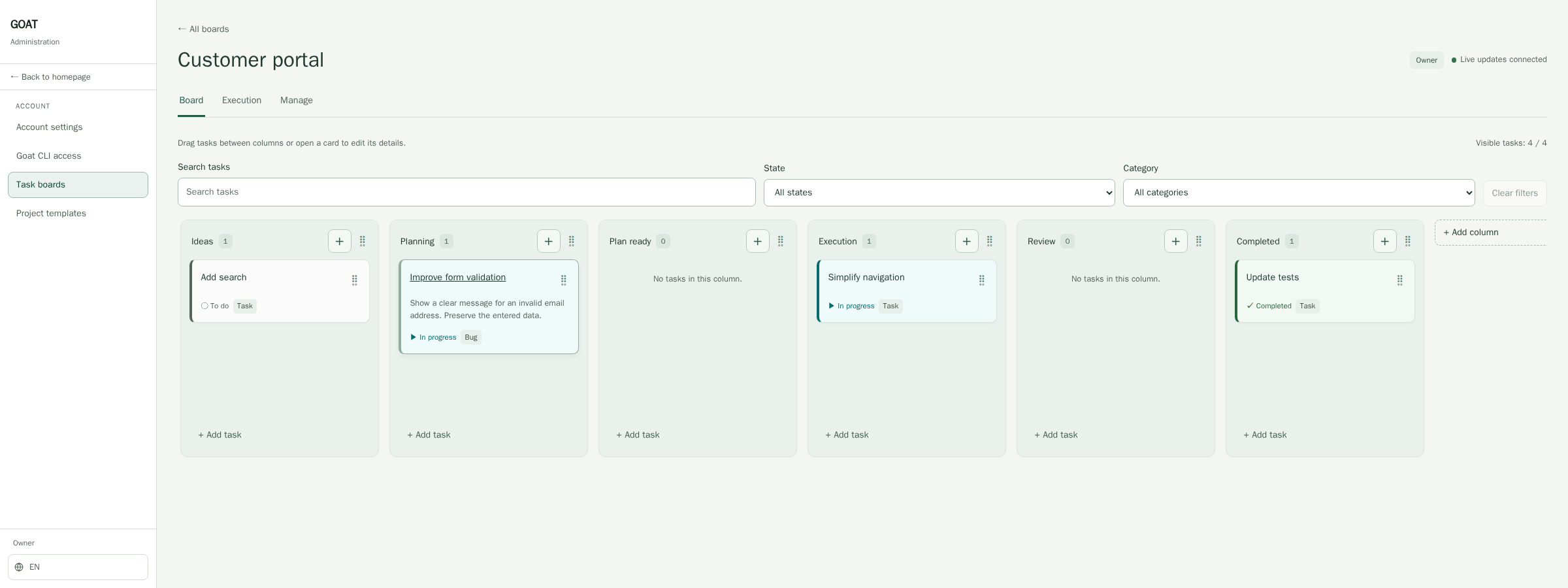
*Visible progress helps you choose the next step.*
Save an idea, revisit it with your team and choose what delivers the most value now.
A small fix with a clear goal
A form rejects an email address, but the user cannot tell why? Create “Improve form validation”. Describe the outcome: a clear message beside the field, with entered data preserved. A concrete problem makes planning easier.
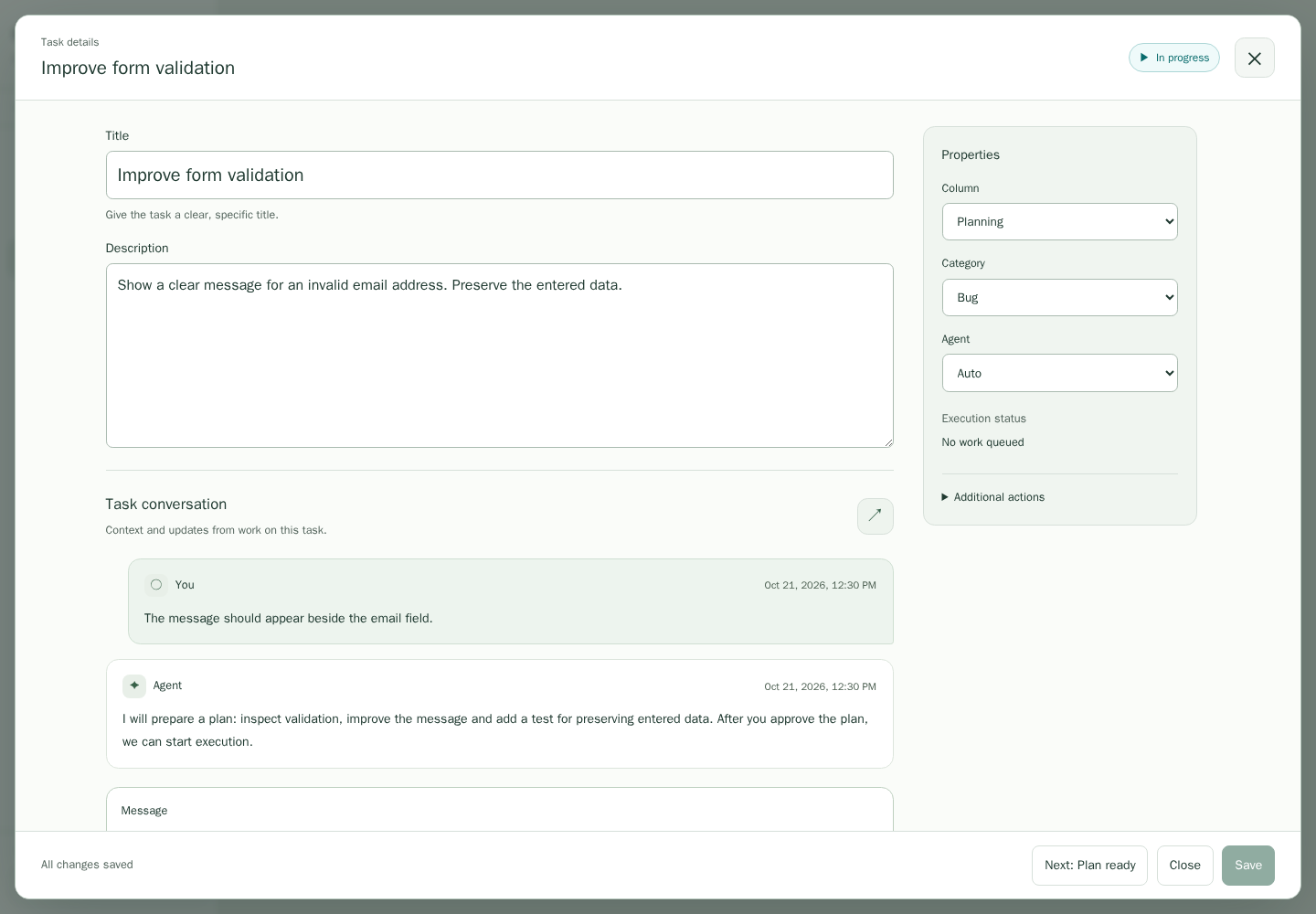
*The goal stays close to the conversation and subsequent work.*
Discuss, clarify, decide
Add details in the AI conversation: “The message should appear beside the email field.” Answer questions and examine the proposed plan. You build context within the same task. AI helps propose a course of action; you assess the scope and result. That leaves more attention for whether the solution helps the user.
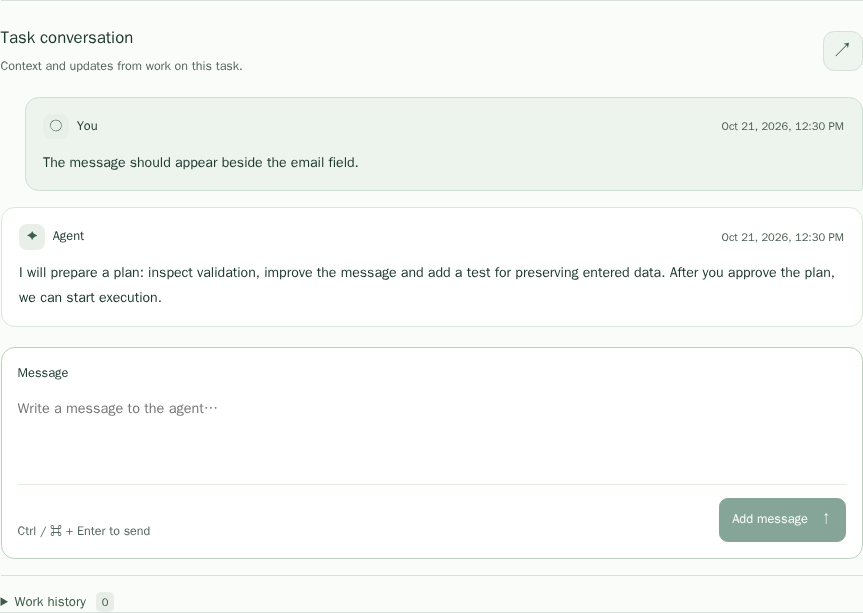
*The screenshots show demonstration data in the real panel.*
Start work and review the result
Configure the project and automation columns. Start the AI worker with goat worker:ai:run. Move the task to planning, refine the plan in the conversation and review it. Moving to Execution approves the scope and starts implementation. Inspect the result and tests.
Automatic review can request corrections; the third rejection requires manual action. Fully automatic mode starts newly completed plans without an additional approval move. Resume reuses the approved plan and retained checkout; an already claimed execution returns to its original worker. A separate CI/CD worker runs tests and deployment after a matching pull request merge, not after an ordinary push. The project owner configures it, copies the one-time webhook secret, and follows the run history in the project's CI/CD tab.
Before updating
Apply pending child migrations before updating server and workers: 1017 adds review, 1018 resume, 1019 automatic plan execution and 1020 CI/CD. Repository details: child/app/boards/README.md, WORKERS.md and CICD.md.
A CI worker signs in with goat login and serves all CI-enabled projects owned by that account. Projects need no worker UUID or token; each keeps its branch, scripts, webhook and secrets. Deploy child migration 1032 and the backend before the panel and new CLI.
Tags and filters
Add a tag in task details by typing its name and pressing Enter or choosing a suggestion. Saving also commits a valid pending entry. A task supports up to 20 tags of 64 characters each. Cards show three tags; +N reveals the rest.
The tag filter opens a searchable checkbox list. Tasks match any selected tag together with the text, state and category filters. Active filters can be removed individually. Filters are saved in the URL and restored on reload, shared links and Back navigation. On mobile, use Filters to expand the additional fields. Find the archive in board actions and column archiving in each column's actions.
Agent commands and change sets
The AI worker provides goat_run_command independently of the agent's Bash.
Regenerate with {"command":"re","args":[]}; run a recipe with{"command":"run:script","args":["--path=@goatcms/herd/test.goat"]}.goat_run_script remains a shortcut, and run:docker runs container commands.
A Bash permission error is not evidence that Goat scripts are unavailable.
The agent must try the supplied tool and report its actual command, exit code
and error. Planning/review allow inspection only; generation runs before them.
Board owners add writable modules in automation settings by name alone: the panel
reads the repository and branch from the project's herd/_modules.goat and checks
the declaration, Git server, write access with the owner's Git profile and branch,
showing the result of each check. Only modules tracking a Git branch can be edited.
The runtime tells the
agent each module's alias, path, branch and access mode. Only granted modules may
be edited; generated goatapp/ is refreshed only by the generator. A work cycle
groups project and module branches, and later tasks continue from their changes.
The worker publishes PRs and reviews changes across all repositories.
The dashboard and board Execution show change sets. Their executor confirms
Merge entire set after reviewing every PR. Modules merge first, the project
last. Partial success is retained and pauses ordinary work; retry reconciles the
result, or a repair task fixes unmerged repositories. New cycles begin only after
full completion. Update the server and panel before the worker. See the repository's
agent guide and worker documentation for examples and the API contract.
Merge queue
New boards have a Merge queue column between Review and Completed; on other
boards choose one in automation settings. Accepted tasks wait there and join the
change set's work branch one at a time, in order; the card shows its position. An
integrated card moves to Completed and its task branch is deleted. If the task needs
more work, moving it back to Execution starts a new task branch from the work branch.
Git resolves conflicts first, reusing resolutions recorded for earlier tasks; the
agent resolves only what remains. A conflict it cannot resolve keeps the card in the
queue with Retry integration and does not hold back later cards. A card moved to
Completed by hand waits in the queue until it is integrated. Before the change set
merges, a work branch behind the target branch receives it by plain Git; if that
conflicts, a conflict task resolves it. Merged work branches are deleted and the next
cycle starts a new one.
After a worker failure
When heartbeats stop, the run becomes interrupted after its 45-second lease expires; maintenance checks every 10 seconds. Reviews are automatically retried, with a manual decision required after three failed attempts. Execution preserves local files: restart the original worker before choosing Resume. An unavailable worker does not hold back later tasks eligible for another worker. Earlier unpublished work must still be resolved before merging the set.
The worker persists a private publication journal before advancing HEAD, so its own commit can be recovered after an interrupted checkpoint or push. It never discards source files or accepts unrelated commits. Losing the machine or disk requires restoring unpublished files from backup. Explicitly cancelled tasks are not automatically retried.
Continuing after an agent quota limit
Auto lets another available agent continue planning and execution: Claude → Codex or Codex → Claude, including on another worker owned by the same user. A manual agent choice pins these two stages. Review remains independent, prefers a different agent from the executor, and can switch after a quota limit.
The worker preserves the approved plan, history and progress. Moving to another computer requires committing and publishing changes in every writable repository. A failed push, excluded large files or an unfinished merge keeps the continuation on the original worker without discarding local changes. When both quotas are exhausted, the task waits in the queue without occupying an active lane and resumes automatically. History shows the handoff and the agent and worker continuing the task.
Deploy migration 1029 and the server first, then update the CLI and panel. Older workers keep waiting for quota renewal and cannot claim the new continuations.
Switching Codex or Claude off
To save tokens for other projects, the project owner can switch Codex enabled and Claude enabled independently under AI agents in project settings. Both are on by default. Work already running finishes; the disabled agent then takes no new plans, executions, reviews or resumes in this project, while other projects stay unaffected. Auto tasks and reviews go to the enabled agent; tasks pinned to a disabled agent wait in the queue with the reason shown on the card and in the queue, and continue once it is enabled again. With both agents off, AI work in the project pauses, but scripts still run. Switching does not invalidate prepared plans. Apply child migration 1036 before deploying the backend and panel.
Choosing the model and effort
Under Models and effort in project settings, the owner sets a model and a reasoning effort separately for Codex and for Claude. In the task properties, every member who can edit the board may override them for one task. Each field is inherited on its own: the task's value, otherwise the board's, otherwise the agent's default on the worker. For example, a task can raise only the effort while the model still comes from the board. Inherit from board in a task and Agent default on the board clear a field.
Codex accepts the efforts none, minimal, low, medium, high and very high; Claude accepts low, medium, high, very high and maximum. The model is a name the agent's CLI accepts, such as gpt-5-codex or opus. The configuration is fixed when a run starts and shown next to its agent in the run history: a running attempt keeps it, the next plan, execution, review or resume uses the current settings. Changes do not invalidate prepared plans. If the agent cannot start with the chosen model or effort, the run fails with a message naming the setting. Apply child migration 1040 and update the worker before relying on these settings; older workers ignore them.
Following a change set merge
The Execution tab shows the current merge stage, repository order, merged
repository count, last activity and next attempt time. What is holding the
merge identifies the pull request, Git check or task requiring attention, with
a link and a suggested action. The dashboard shows the same summary.
Expand Merge history and logs for timestamps, outcomes and technical details
of each operation. Older events can be loaded without losing the current view.
History begins with the first attempt after this feature was deployed; earlier
logs are not reconstructed. Logs survive server restarts and contain no Git
tokens or raw response bodies.
The server checks waiting conditions every 20 seconds. Temporary Git failures
retry after 20, 40, 80, 160 and then at most 300 seconds. Retry now requests
an earlier check without duplicating an active operation. Conflicts use a linked
repair task; required reviews and failed checks remain visible until resolved.
No confirmed activity indicates an expired attempt or an overdue check,
whereas an API connection warning means the panel cannot refresh its data.
Apply child migration 1033 before deploying the updated backend and panel.
Test artifacts and the agent browser
Task history contains screenshots, reports and traces from E2E tests and browser sessions. They have no age-based expiry and remain available after resuming on another worker. Archiving preserves them; deleting a task removes its artifacts. HTML reports and archives are downloads. Storage and quota failures are reported separately from test results.
An optional browser starts on the agent's request during execution, with a disposable test application and a fresh profile. It uses no personal accounts or passwords. Only the task application is accessible by default. Public websites require the owner's project setting and a task grant from a person authorised to execute it. Agents can request that grant; use the explicit Allow/Deny actions in the conversation. A normal text answer does not change permission. Grants survive task resumptions, while disabling the project setting blocks access. The host, LAN and metadata services remain inaccessible.
Apply child migration 1034 and configure persistent artifact storage before deploying the backend and panel; enable the browser on a worker afterwards. Workers without a browser keep working unchanged.
Task and backlog attachments
Attach files such as logos, CSV data or Excel spreadsheets to tasks and backlog items. Download or remove them in the details view. When creating or linking a task from a backlog item, select which files to copy; copies remain independent of their originals. Defaults are 50 MB per file and 50 files per task. Agents receive files under .goat/attachments/{id}/{name} before planning, execution and review, with a list in their prompt. This directory is excluded from commits; agents can copy needed assets into the repository.